
Outside of using Twitter’s own Web interface, there are a number of applications, clients and tools you can download to make tweeting a better, faster process.
Twitter is a popular microblogging service that wants you to provide the answer to “What are you doing?” in 140 characters or less. Twitter is often used to share links to pages and other Web content and to update your friends and followers on what’s new. Some businesses also use Twitter as an online marketing tool to promote products and services via online tweets.
When you create your Twitter account, the site offers a basic update form box where you can send out your tweets. Outside of using Twitter’s own Web interface, there are a number of applications, clients and tools you can download to make tweeting a better, faster process.
To help you sort out the best options for tweaking your Tweeter tactics, we take a look at several cool and useful Twitter tools including URL shrinks, Twitter clients and Twitter Web widgets to get you started.
Shrink That URL
One of the most important tools used by Twitterers are URL shrinkers online services that will take a long URL you want to include in your Tweet and shrink it down. Technically speaking, these Web services provide short aliases for redirecting long URLs, however URL shrink is the more common description to use.
So, why would you need to redirect a URL? Remember that tweets are limited to 140 characters and you really don’t want to waste that space with a long URL. That is why tweeple love URL shrinkers. You can toss out a URL and still have character space to describe what is on that Web page.
These types of Web services all work in the same way, however they may offer some different features. When you visit the service’s Web site you add your long URL, click submit and then copy and paste the returned alias to use in your tweet. Using a Webopedia article URL, we’ll show you how how many characters you can shave off a URL using different shrink services.
Webopedia Text Messaging Guide: https://www.webopedia.com/reference/text-abbreviations/ (63 characters)
TinyURL: created http://tinyurl.com/5o61 (23 characters)
bit.ly: created http://bit.ly/13FyF (19 characters)
is.gd: created http://is.gd/bBZS (17 characters)
The URL shrink services are also useful for tasks other than tweeting. You can use them to create short links for e-mail to prevent long links from being broken due to e-mail client line breaks. You can also use the URL service to mask affiliate referral links and other tracking code in a URL. It is important to remember that once you use a short URL and sent it out via Twitter, e-mail or your Blog, you are at the mercy of the short URL provider -that is, if their service is down your link will not work.
More Than a Basic Tweet Box
The default tweet option on Twitter is a simple text box on your homepage where you can type in your message and hit update. For those who want more features and options, you can download a Twitter desktop client or use other third-party Web clients. This enables you to update your Twitter account and access handy features not readily available through Twitter’s own Web interface. Here are three clients you may want to try:
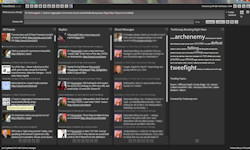
Screenshot: TweetDeck lets you easily do things such as retweet and create groups.
TweetDeck lets you view all Tweets in real-time, Tweet directly from the client, create a more personal dashboard for monitoring retweets and direct messages. You can also create groups to make it easier to follow colleagues, friends and other interest groups. You can also use TweetDeck to update Facebook, follow Facebook friends, and many other options. TweetDeck runs on Mac, Windows and Linux platforms.
Hootsuite is a social media management site that allows you to schedule posts for several different accounts across multiple social media platforms.
ManageFlitter is a tool that allows users to sort, filter, and manage who they follow on their Twitter accounts. ManageFlitter also allows you to manage multiple accounts at the same time.
PocketTweets is a client for those who like to Tweet using an iPhone. This Web-based Twitter client lets you see the latest Tweets from your contacts, update your status remotely, or view the public timeline – all via EDGE or Wi-Fi. To use PocketTweets, you simply need to access their Web site using your iPhone.
Widgetize Your Tweets
Twitter Web widgets are an excellent tool for those who want to include their Twitter feed on a blog, MySpace or any Web page you author. Simply by updating your Tweets your Web widget will display the new content to your readers and followers elsewhere on the Web.
Twitter widgets are useful in that you can update once (via twitter) and pump fresh content out to your other pages. For example, on a business site you can tweet business-oriented news and links and have those displayed in your b-blog. While some blogging services (like WordPress) have a Twitter widget you can add via your blog dashboard, you can use any of the following widgets for placing your Twitter feed on other pages. Simply edit the Widget to pull the feed from your user account and then copy and paste the provided widget code into your site.
Widgets by Twitter is the service’s own widget offering. You can use the Twitter widget to lead visitors to your blog or Web page to let them know what you’re up to at the moment. You can customize this widget to display your latest updates. Widgets by Twitter lets you design an interactive or display-only widget for MySpace, Blogger, Facebook, Typepad or you can get the code to use the widget on any of your personal Web pages.

Screenshot: Widgets by Twitter lets you display tweets on your own blog.
Recommended Reading
Based in Nova Scotia, Vangie Beal is has been writing about technology for more than a decade. She is a frequent contributor to EcommerceGuide and managing editor at Webopedia. You can tweet her online @AuroraGG.
This article was last updated on September 03, 2014